Style Guide and File Organization for Modern Web Projects
📤 Compartilhe este artigo com o link curto:
The Importance of a Clean Front‑End Architecture
When we start building a new website or web application, it is common to pile all the code into a single folder or mix CSS styles directly inside HTML tags (inline styles). However, as the project gains new pages, style files, and behavior scripts, this lack of organization turns into a true maintenance nightmare, known in software engineering as "spaghetti code".
Establishing a clean directory tree and following consistent style patterns from the first day of development ensures scalability, maintainability, and efficient team collaboration.
Standardization of the Directory Tree
A well‑organized file structure should clearly separate static assets, page components, and style sheets. A highly recommended corporate standard for small‑ to medium‑sized web projects follows this division:
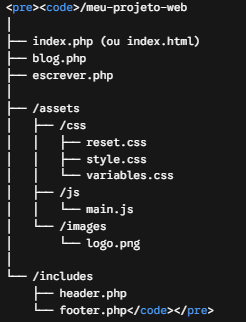
Purpose of each main directory:
- Project Root: Contains only routing files and pages directly accessible by the browser.
- /assets/css: Houses all style sheets. It is highly recommended to separate global variables (colors, fonts, and spacings) into dedicated files.
- /assets/js: Stores client‑side interactivity and DOM manipulation scripts.
- /includes: Stores reusable modular blocks (like the default header and footer) that are dynamically incorporated via PHP.
Best Practices for Writing CSS Styles
Keeping CSS code clean and reusable avoids specificity conflicts and speeds up page loading. Some fundamental practices include:
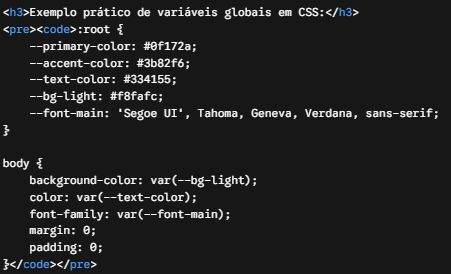
- Use of CSS Variables (Custom Properties): Centralize brand colors, fonts, and spacings in the :root element to facilitate future visual changes site‑wide with a single modification.
- Abandon Inline Styles: Never use style="..." attributes directly in HTML tags. Keep all visual presentation isolated in external style sheets.
- CSS Reset or Normalization: Always use a basic reset file to zero out native margins, paddings, and rendering inconsistencies across different browsers (Chrome, Firefox, Safari).
Practical example of global CSS variables:
Modularization with Includes
Manually repeating navigation menu and footer code on every new page is outdated. Using dynamic PHP includes, for example, centralizes maintenance:
<?php include 'includes/header.php'; ?> <main> <h1>Welcome to my Technical Blog</h1> <p>In‑depth content about development, databases, and technology.</p> </main> <?php include 'includes/footer.php'; ?>
If tomorrow you need to change a link in the top navigation menu, just modify the header.php file once, and the change will instantly reflect across the entire site.
Conclusion
Organizing files with discipline and structuring styles in a modular way is not bureaucracy, but a direct investment in the longevity, performance, and professional quality of any web‑oriented software project.